
Master AI Prompt Engineering: The Ultimate Framework, Techniques & Templates
Learn the four-part framework behind reliable AI prompts, the techniques that improve results, real before-and-after examples and ready-made templates for ChatGPT, Claude and Gemini.
AI assistants such as ChatGPT, Claude and Gemini can outline an article, explain a WordPress error or summarize a long report in seconds. Yet many people get answers that are vague, generic or simply off target, and decide the tool is not very good. In most cases the real problem is the prompt. The model only knows what you tell it, so a one-line request forces it to guess your audience, your goal and the format you need.
Prompt engineering is the skill of closing that gap. You do not need to write code or memorize magic phrases. You need to brief the AI the way you would brief a capable new colleague: who they are working as, what the situation is, exactly what you want and what the finished result should look like.
By the end of this guide, you will know:
- what prompt engineering is and why the same question can produce very different answers;
- the four-part framework of role, context, task and constraints that works in ChatGPT, Claude, Gemini and similar tools;
- how weak prompts compare with structured ones, plus templates you can adapt;
- the main prompting techniques, a step-by-step method for refining prompts and the common mistakes that waste time.
Quick Answer: What Makes an AI Prompt Work?
A good prompt gives the AI the information it would otherwise have to guess. Vague, generic or repetitive output from ChatGPT, Claude or an image tool like Midjourney usually comes from unstructured input rather than a weak model. Strong prompts tend to include four things:
- Role: who the AI should act as, which sets the expertise, vocabulary and point of view (for example, "an experienced SEO strategist").
- Context: the background it cannot know on its own, such as your audience, your website, your goal and what you have already tried.
- Task: the exact deliverable, stated plainly ("write five title options", not "help with titles").
- Constraints: the rules for the result, including length, tone, format and anything to avoid.
You will not need all four parts for every question. A quick fact check only needs a clear task. The more the result matters, the more each part pays off.
What Is Prompt Engineering?
A prompt is the instruction or question you give an AI model, together with any text, data or examples you include with it. Prompt engineering is the practice of designing those inputs so the model produces accurate, relevant and usable output, and then improving them through testing.
In everyday terms, it is the difference between telling a designer "make me a logo" and handing them a short brief with your business name, your audience, the style you like and where the logo will be used. Both are requests, but only the second gives the designer enough to do good work on the first attempt.
The name sounds technical, but for most people prompt engineering comes down to clear communication. Developers who build AI features into apps apply the same principles at a larger scale: they write detailed system instructions, test them against many different inputs and refine them like any other part of their product. For bloggers, marketers, students and business owners, the everyday version is simply writing better requests and reusing the ones that work.
How Prompts Shape AI Answers
Large language models (LLMs), the technology behind ChatGPT, Claude and Gemini, write a reply by repeatedly predicting what text should come next, based on patterns learned during training and on everything in the current conversation. They do not know who you are, what your website is about or what a good result looks like for this particular job unless that information is in your prompt, in earlier messages or in saved settings.
That is why small changes in wording can produce very different results. This is roughly what happens when you send a prompt:
- The model reads everything as context: your current message, earlier messages in the same chat and any standing instructions or files attached to the conversation.
- It works out what kind of response fits: an explanation, a list, a table, code, a formal email or a casual reply.
- It writes the answer piece by piece, with each part shaped by what came before. Clear requirements keep the whole answer on track, while a vague start tends to lead to a vague middle and end.
- It fills any gap with the most typical assumption. This is where generic output comes from: an average audience, an average length and an average tone.
- Your follow-up messages become context for the next answer, which is why refining a response in the same chat usually works better than starting again with a new one-liner.
Two practical lessons follow. First, every detail you leave out becomes a guess. Second, the model can sound confident even when a guess is wrong. A well-structured prompt improves your chances of a useful answer, but it never replaces checking the result.
What You Can Use Structured Prompts For
Prompt engineering is useful wherever you ask AI to produce something you would otherwise write, plan or analyze yourself. These are some of the most common uses:
- Blogging and content writing: outlines, first drafts, introductions, headline options and rewrites for a different audience. Context about your readers and your site's voice is what turns generic copy into usable copy.
- SEO tasks: title tags, meta descriptions, FAQ ideas and content briefs. Constraints such as a character range or "use the main keyword once, naturally" keep results within practical limits, although you should still check search intent and facts yourself.
- WordPress and technical troubleshooting: explaining error messages, listing likely causes and walking you through fixes. Including your software versions, what changed recently and the exact error text makes the answer far more precise.
- Coding: writing or explaining snippets, converting code from one language to another, and creating regular expressions or spreadsheet formulas. Naming the language, version and environment avoids answers that do not run.
- Research and summaries: turning reports, meeting notes or long articles into key points, action items or comparison tables. Pasting the source material and asking the model to stick to it reduces invented details.
- Business communication: emails, proposals, customer replies and job descriptions written in a specific tone for a specific reader.
- Learning: explanations pitched at your level, analogies, practice questions and step-by-step walkthroughs of new topics.
- Image generation: tools such as Midjourney respond best to clear descriptions of the subject, style, composition and lighting. The four-part framework still helps you decide what you want, although image prompts are usually shorter and more descriptive than text prompts.
Key Benefits of Structured Prompting
A structured prompt takes a minute or two longer to write than a one-line request. Here is what you get for that time, and why it matters.
Better first drafts and less editing
When the model knows the audience, length and format from the start, the first response is much closer to what you need. Instead of rewriting a generic draft or sending five follow-up messages, you can spend your time on the parts that need human judgment: checking facts, adding real examples and putting the text in your own voice.
More relevant, specific answers
Context replaces assumptions. A troubleshooting request that includes your WordPress version, your theme and the exact error message gets causes that apply to your site, not a generic list of ten things that might be wrong with any website.
Consistent results you can repeat
Once a prompt works, you can save it as a template. Next week, or when a colleague uses it, the output follows the same structure and tone. For a blog, that means consistent formatting across articles. For a business, it means customer replies and reports that all meet the same standard.
Easier quality control
When you have stated the rules, such as "use only the information below", "flag anything you are unsure about" or "keep each section under 150 words", it is easy to see whether the output followed them. Clear instructions make mistakes easier to spot, which matters because AI tools can still produce confident errors.
A skill that works in every AI tool
The framework works in ChatGPT, Claude, Gemini, Microsoft Copilot and most other assistants because it is based on clear communication rather than tricks tied to one product. When you switch tools or a new model is released, your prompts need small adjustments, not a complete rewrite.
The Core Problem: Why Most Prompts Fail
Most weak prompts share one root cause: people type to an AI the way they type into a search engine. A search engine needs a few keywords and returns pages that already exist. A language model writes a brand-new answer, and if you only give it a few keywords, it has to invent everything else.
Ask for "a blog post about website speed" and the model has to guess who the readers are, how technical to be, how long the post should be, which points to cover and how to format it. It plays safe with the most typical choices, which is why the result reads like a generic overview you could find anywhere.
The same failure patterns appear again and again:
- No audience: the model writes for everyone, which usually means it writes for no one in particular.
- No clear deliverable: "help me with my homepage" could mean new copy, design ideas or a technical audit.
- Too many jobs in one request: research, outline, draft and edit in a single prompt usually means each part is done superficially.
- No format: without instructions, you get the model's default layout, which is often long paragraphs or a list of generic tips.
- No examples or source material: the model cannot match a style it has not seen or stick to facts it has not been given.
A structured framework removes this guesswork, and with it most of the editing time that follows.
The 4-Part Prompt Engineering Framework
The framework below turns a vague request into a clear brief. It reflects the advice in the official prompting guides from OpenAI, Anthropic and Google: say exactly what you want, give the background the model lacks and describe the format you expect. Google's guide for Gemini, for example, organizes prompts around a persona, a task, context and a format, which are essentially the same four building blocks.
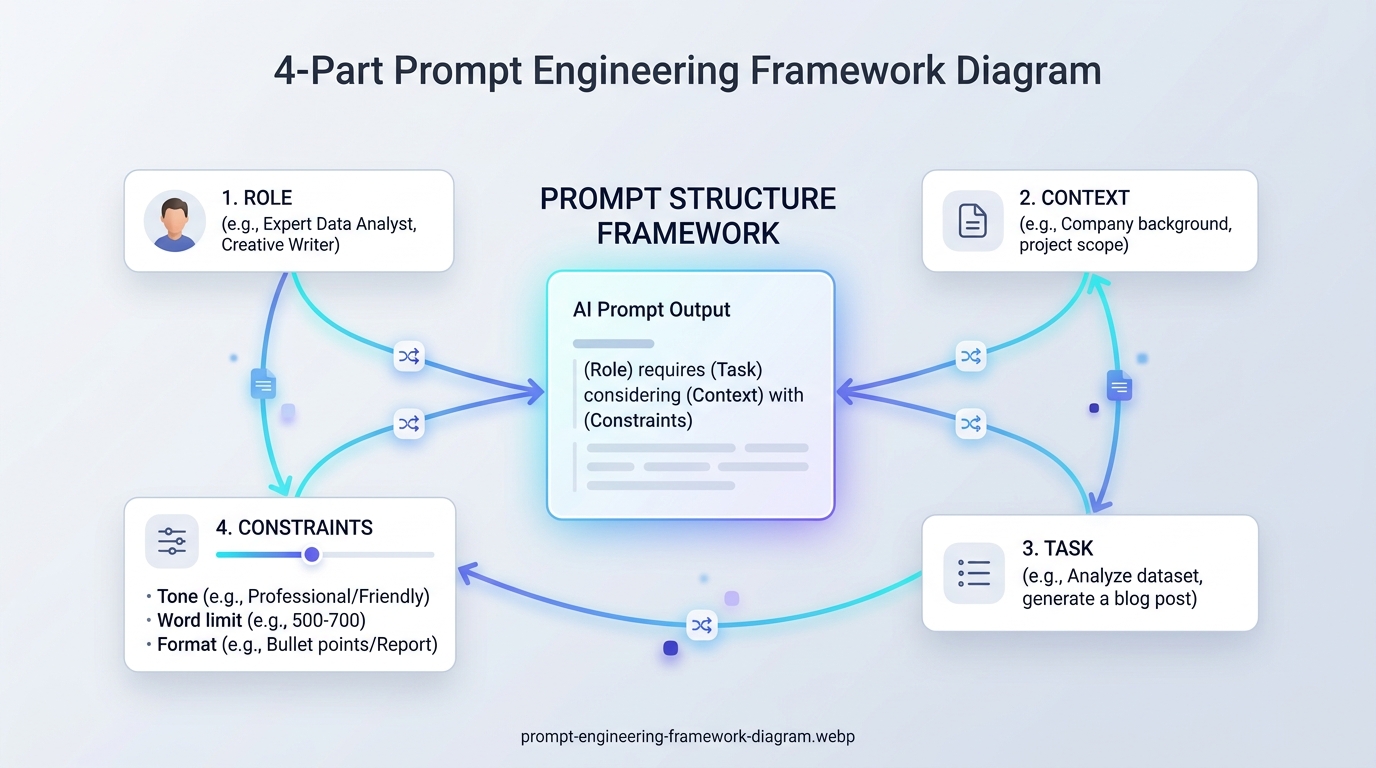
| Component | Purpose | Example |
|---|---|---|
| 1. Role & Persona | Sets the expertise, vocabulary and point of view the answer should come from. | "Act as a senior WordPress developer who explains things to non-technical site owners." |
| 2. Context & Audience | Gives the background the model cannot know: who the output is for, where it will be used and what has already been tried. | "Our readers run small WordPress blogs on shared hosting and have never edited code." |
| 3. Actionable Task | States the exact deliverable in one clear instruction. | "Write a 700-word troubleshooting guide on fixing render-blocking JavaScript." |
| 4. Constraints & Format | Controls length, tone, structure and anything to avoid. | "Use H2 headings and numbered steps, include one code snippet per fix and avoid unexplained jargon." |
1. Role and persona
A role tells the model which perspective to answer from. "Act as an experienced copy editor" leads to different priorities than "act as an SEO strategist", even for the same piece of text. Keep the role realistic and relevant to the task, and one sentence is usually enough. A role sets the angle and the vocabulary, but it does not give the model knowledge it does not have, so it is no substitute for context or for checking facts.
2. Context and audience
Context is usually the most valuable part of a prompt and the part people skip most often. Useful context includes who will read or use the output, how much they already know, where the output will appear (a blog post, an email, a product page), what you want to achieve and relevant details such as your software versions or what you have already tried.
It also helps to explain why a requirement exists. Anthropic's guide points out that the reason behind an instruction helps the model apply it sensibly. "Keep paragraphs short because most readers visit on their phones" gives the model more to work with than "keep it short".
3. Actionable task
State the deliverable as a direct instruction with a clear verb: write, summarize, compare, rewrite, list or explain. If you need several outputs, number them or split them into separate prompts. "Write five title options under 60 characters" is a task; "something about titles" is not.
4. Constraints and format
Constraints define what a good result looks like: length, tone, reading level, structure (headings, bullet points, a table with named columns) and anything to leave out. Two habits make them work better. First, say what to do rather than only what to avoid: "write in short paragraphs of two or three sentences" is clearer than "don't write long paragraphs". Second, when the format really matters, include a short example of it.
Putting the four parts together
Here is how the components combine into one complete prompt:
Role: Act as a senior WordPress performance consultant.

Context: I run a recipe blog on shared hosting. My readers are home cooks, and I am not a developer. PageSpeed Insights shows a poor mobile score, mainly because of large images and render-blocking files.

Task: Write a step-by-step action plan I can follow this weekend to improve my mobile page speed.

Constraints: Use numbered steps in order of impact. For each step, explain what it does in one or two plain sentences and name the type of plugin or setting involved rather than specific brands. Keep it under 500 words and point out any step that needs a backup first.
Labels such as "Role:" and "Context:" are optional, but they make longer prompts easier for you to scan and for the model to follow.
Before and After: Practical Prompt Examples
The difference is easiest to see side by side. Each example shows a typical one-line prompt, a structured version of the same request and why the second one works better.
Example 1: Planning a blog post
Weak prompt
Write a blog post about WordPress security.
Structured prompt
Act as an experienced WordPress security consultant who writes for beginners.
My blog is about home gardening, and my readers are not technical. I want a post that helps them protect a small WordPress site without hiring a developer.
Create a detailed outline for a 1,500-word post titled "WordPress Security for Beginners: 10 Simple Steps".
Use an H2 heading for each step, add two or three bullet points under each one explaining what to do and why it matters, and finish with a short checklist. Avoid alarming language and do not recommend specific paid products.
Why it works: the model knows the audience, the deliverable (an outline rather than a full post), the structure and the tone. You can review and adjust the outline, then ask for one section at a time, which usually produces deeper content than requesting 1,500 words in one go.
Example 2: Troubleshooting a WordPress error
Weak prompt
My WordPress site is broken. How do I fix it?
Structured prompt
Act as a WordPress support engineer.
Since this morning my site shows "There has been a critical error on this website." I can still log in to my hosting control panel. Yesterday I updated two plugins and my theme. The site runs on PHP 8.2.
This is the last error in my debug log:
"""
[paste the error line here]
"""
Explain what the error most likely means, then give me the safest steps to get the site back online, starting with the ones that cannot cause data loss. Ask me for any information you need before suggesting a fix.
Why it works: it includes the exact symptom, what changed recently, the environment and the real error message, and it asks for the safest steps first. The last line, which invites the AI to ask for missing information, stops it from guessing.
Example 3: Summarizing meeting notes
Weak prompt
Summarize this.
Structured prompt
You prepare meeting summaries for busy managers.
Below are the raw notes from a 45-minute project meeting about our website redesign.
Summarize them in three parts: (1) decisions made, (2) action items with the owner and deadline for each, (3) open questions.
Use bullet points, keep the whole summary under 200 words and use only information from the notes. If an owner or deadline is missing, write "not specified" instead of guessing.

Notes:
"""
[paste the notes here]
"""
Why it works: a clear structure, a length limit and an instruction to stay within the source text. The "not specified" rule is a simple way to stop the model from filling gaps with invented details.
Prompt Templates for Common Tasks
These templates follow the four-part framework. Replace the text in square brackets and add any context that is specific to your situation. Treat them as starting points rather than fixed scripts: the details you add are what make the output yours.
Blog post outline
Act as an experienced [niche] blogger and SEO writer.
My audience: [who they are, what they already know and what they want to achieve].
Create a detailed outline for an article titled "[title]" that targets the search query "[main keyword]".
Include an introduction, H2 and H3 headings, the key points under each heading, a FAQ section with [number] questions and a conclusion. Keep the tone [tone] and mark any point that needs a source or a fact check.
SEO titles and meta descriptions
Act as an SEO copywriter.
Page topic: [topic]. Main keyword: [keyword]. Audience: [audience].
Write [five] title tag options of roughly 50 to 60 characters and [three] meta descriptions of roughly 140 to 160 characters. Use the main keyword naturally once in each, make clear what the reader gets from the page and avoid clickbait and words in capital letters.
Technical troubleshooting
Act as a [WordPress / web hosting / spreadsheet] support specialist.
Problem: [what happens, including any exact error message].
Environment: [software, versions, hosting or device].
What changed recently: [updates, new plugins, new settings].
What I have already tried: [steps].
List the most likely causes in order of probability, then give step-by-step fixes, starting with the safest. Tell me what to back up first and ask for any missing information instead of assuming it.
Editing or rewriting text
Act as a professional editor.
Rewrite the text below for [audience] who will read it on [platform]. Keep the meaning and all facts unchanged, use a [tone] tone, shorten long sentences and replace jargon with plain words. Return the edited text first, followed by a short list of the main changes.

Text:
"""
[paste your text here]
"""
Learning a new topic
Act as a patient teacher.
I am [your level, for example a beginner with no coding experience] and I want to understand [topic] well enough to [goal].
Explain it in simple terms with one everyday analogy, then give me three short practice questions. Wait for my answers before you explain the correct ones.
Prompt Engineering Techniques Explained
The four-part framework tells you what to include in a prompt. The techniques below change how the model approaches a task. They appear throughout the official guides from OpenAI, Anthropic and Google, and most everyday prompts use one or two of them without naming them.
Zero-shot prompting: clear instructions, no examples
A zero-shot prompt gives instructions without showing any examples, such as "Summarize this article in five bullet points for busy managers." It is the right starting point for most tasks, because current models follow clear instructions well. OpenAI's guides recommend trying a prompt without examples first and adding examples only when the results are not good enough.
Few-shot prompting: teaching by example
A few-shot prompt includes a small number of examples of the input and the output you want, then asks the model to handle a new input in the same way. It is one of the most dependable ways to get a specific format or style, such as product descriptions that follow your store's pattern or headlines in your brand voice. Use examples that differ from each other so the model learns the pattern instead of copying one example. Anthropic's guide suggests three to five well-chosen examples for the most reliable results.
Write a one-sentence summary for each tutorial in the same style as these examples.

Tutorial: How to Install WordPress
Summary: Set up WordPress on your hosting account step by step, with no coding needed.

Tutorial: How to Back Up Your Website
Summary: Create a complete backup you can restore quickly if anything goes wrong.

Tutorial: How to Compress Images for the Web
Summary:
Ending the prompt with an unfinished "Summary:" line shows the model exactly where its answer belongs and what shape it should take.
Role prompting: setting the perspective
Giving the model a role, such as "You are an experienced technical editor", focuses its vocabulary, priorities and level of detail. Anthropic notes that even a single sentence describing a role helps focus the tone and behavior of the response. A role works best when it matches the task and is combined with real context. On its own, it does not add knowledge the model lacks.
Step-by-step reasoning (chain of thought)
For problems with several steps, such as comparing options, checking a calculation or diagnosing an error, asking a standard chat model to work through the problem before it gives a final answer often improves accuracy and lets you check the logic.
Reasoning models, such as the "thinking" modes now offered in many AI assistants, are different: they already work through problems internally before answering. OpenAI's guidance for its reasoning models says that asking them to "think step by step" is unnecessary and can sometimes make results worse. With these models, a clear goal and clear constraints work better than instructions about how to think.
Prompt chaining: one big job, several small prompts
Prompt chaining splits a large task into a sequence of smaller prompts, where the output of one step becomes the input for the next. Each step gets the model's full attention, and you can check and correct the work between steps. Anthropic's guide recommends this approach whenever you want to inspect intermediate results. A typical chain for a blog article looks like this:
- Ask for an outline based on your audience and main keyword.
- Review and edit the outline yourself.
- Ask for one section at a time, including the approved outline each time.
- Ask the model to check the full draft against your requirements.
- Finish with your own edit for accuracy, examples and voice.
Structured output: asking for an exact format
When you plan to paste the result into a spreadsheet, a content management system or code, ask for a precise structure: a table with named columns, a numbered list with a fixed number of items or JSON with specific keys. Naming the structure removes most of the guesswork, and a one-line sample of the format removes most of what is left.
Compare the three caching options below in a table with exactly four columns: Option, What it does, Best for, Difficulty (Easy, Medium or Hard). Do not add any text before or after the table.
Self-review: asking the model to check its work
After you receive a draft, ask the model to review it against your criteria, for example: "Check the draft above against these requirements and list anything that is missing: under 800 words, one practical example per section, no unexplained jargon." Anthropic describes the same draft, review and refine pattern for its models. It catches missing pieces quickly, but it does not replace your own review, because a model can overlook its own factual mistakes.
Techniques at a glance
| Technique | Best for | Example |
|---|---|---|
| Zero-shot | Most everyday tasks | "Summarize this report in five bullet points for busy managers." |
| Few-shot | Matching a format or style | Two or three sample product descriptions, followed by a new product |
| Role prompting | Setting expertise and tone | "You are an experienced technical editor." |
| Step-by-step reasoning | Multi-step problems in standard chat models | "Compare the options step by step before you recommend one." |
| Prompt chaining | Long or complex projects | Outline first, then each section, then a review |
| Structured output | Results you will paste elsewhere | "Return a table with exactly these four columns." |
| Self-review | Checking a draft against your brief | "List anything this draft is missing from my requirements." |
How to Write a Better Prompt, Step by Step
Use this process for any task where the result matters. It takes a few minutes the first time and quickly becomes a habit.
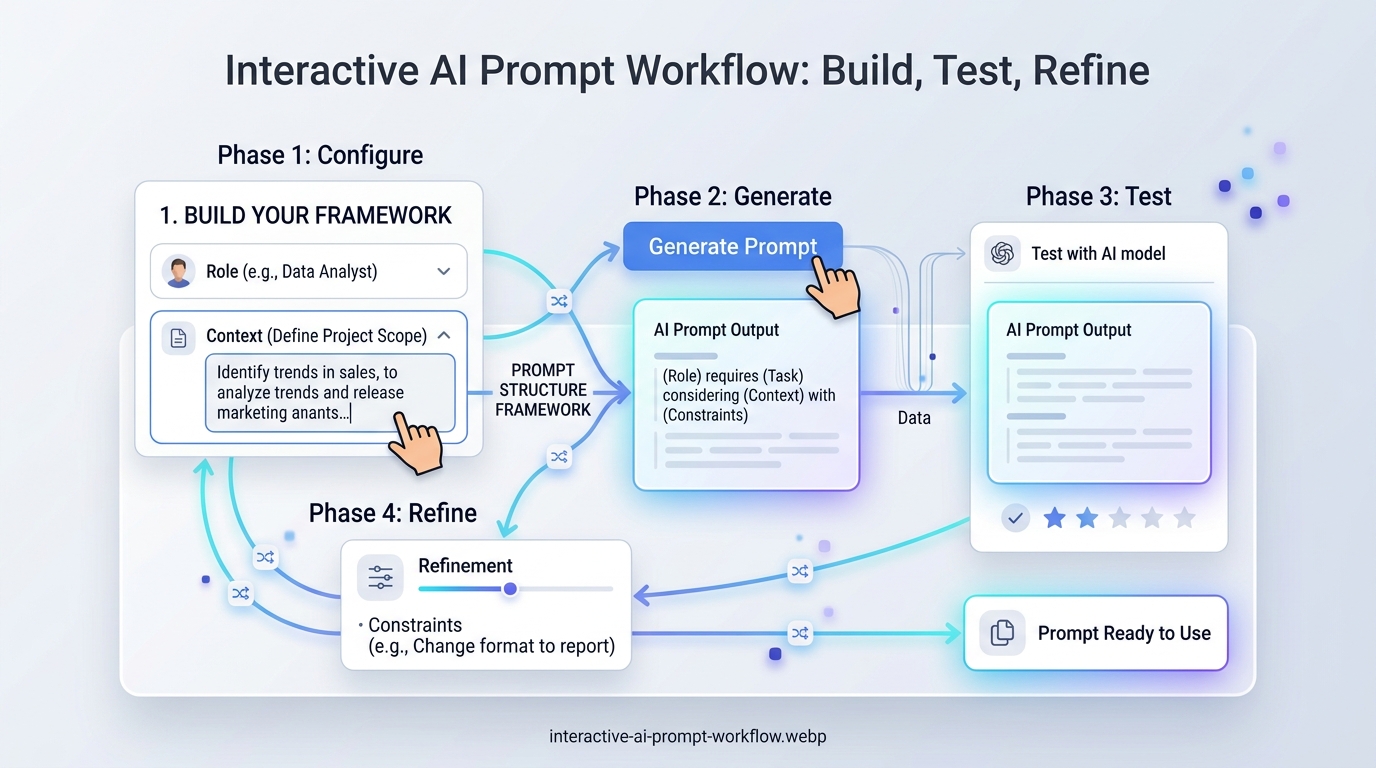
- Decide what a good result looks like. Before you type, picture the finished output: a ten-point checklist, a 300-word email or a table comparing three plugins. If you cannot describe it, the AI cannot produce it.
- Assign a relevant role. Choose the expert who would normally do this work. One sentence is enough.
- Give the context only you know. Include the audience, purpose, platform, relevant facts and versions, any requirements from your client or manager and what you have already tried.
- State one clear task. Use a direct instruction. For big jobs, split the work into stages, such as an outline first, then each section, then an edit, and run each stage as a separate prompt.
- Set constraints and a format. Specify the length, tone, structure, reading level and anything to avoid. If the format matters, include a short example.
- Separate instructions from pasted material. Put pasted text, data or code between clear markers and say what it is, for example "The article below is my draft". OpenAI's guide suggests markers such as ### or """, while Anthropic's suggests XML-style tags such as <article> and </article>. With very long documents, Anthropic recommends placing the document first and your question at the end.
- Invite questions. For complex tasks, add "Ask me any questions you need before you start." A good clarifying question often reveals context you forgot to give.
- Review the output critically. Check facts, figures, links, names, dates and code before you use anything, and note what is missing or wrong.
- Refine one thing at a time. Reply with specific feedback, such as "Make the introduction half as long and add a real-world example to step 3", rather than "make it better". If a long chat starts drifting, open a new one with an improved prompt.
- Save what works. Keep successful prompts in a notes app or document so you can reuse them as templates.
Advantages and Limitations of Structured Prompting
Structured prompting is worth the effort for most real work, but it is not magic. Here is an honest look at both sides.
Advantages compared with quick prompts
| Aspect | Quick one-line prompt | Structured prompt |
|---|---|---|
| Time to write | A few seconds | A few minutes, less once you use templates |
| First answer | Generic, built on assumptions | Tailored to your audience, goal and format |
| Follow-up needed | Often several rounds of corrections | Usually fewer rounds, focused on details |
| Consistency | Varies from one attempt to the next | Repeatable when saved and reused as a template |
| Best for | Simple facts, quick definitions and loose brainstorming | Content, troubleshooting, summaries and anything you publish, send or reuse |
Clear instructions such as "use only the information provided" and "flag anything you are unsure about" also reduce invented details, although they do not eliminate them.
Limitations
- It takes time up front: writing a full brief takes longer than typing one sentence, which is unnecessary for simple questions.
- It cannot fix missing knowledge: no prompt can make a model aware of recent events or private facts it has not been given. Provide the information yourself or use a tool with web access, and verify the result.
- It does not guarantee accuracy: models can still produce confident mistakes, often called hallucinations, especially with statistics, quotes, sources and code.
- Results vary between tools and versions: a prompt tuned for one model may need adjusting for another, or after an update.
- Long prompts can backfire: piling on rules can bury the important ones or create contradictions. Keep only the instructions that change the result.
- Templates can make content formulaic: if every article starts from the same prompt, add your own examples, opinions and experience to keep your writing distinctive.
- Privacy still matters: anything you paste is processed by the AI provider under its own policies, so do not paste passwords, client data or personal information you are not allowed to share.
Tips and Best Practices for Better Prompts
- Use the colleague test. Anthropic suggests imagining your prompt in the hands of a capable colleague who knows nothing about the task. If they would need to ask questions, add that information.
- Replace vague words with numbers. "About 120 words", "three options" or "a table with columns for feature, price and best use" works better than "short" or "a few". OpenAI's guide calls this reducing fluffy, imprecise descriptions.
- Explain the reason behind important rules. "Avoid jargon because readers are complete beginners" helps the model handle borderline cases sensibly.
- Use examples to match a style. If you want the output to sound like your existing articles, paste two or three short samples and label them as examples. A few varied samples help the model follow the pattern without copying one of them too closely.
- Ask the AI to improve your prompt. Paste your draft and ask, "What information is missing from this prompt to get a high-quality result?" Google's guide for Gemini even suggests using the assistant as your prompt editor.
- Store context you repeat. If you always explain the same audience and writing style, keep that paragraph ready to paste, or use the saved instructions or project features that many AI assistants now offer.
- Test important prompts more than once. AI answers vary between attempts, so run a prompt you plan to reuse two or three times, and in the tool you will actually use, before you rely on it.
- Verify before you publish. Treat AI output as a draft from a fast but fallible assistant: check facts, test code on a staging or test site and make sure the final text reflects your own knowledge and voice.
Common Prompting Mistakes to Avoid
- Being vague about the goal: "Help me with SEO" leaves the model guessing. Say exactly what you need, such as "suggest ten long-tail keywords for a beginner guide to WordPress backups".
- Forgetting the audience: an explanation for developers and one for beginners should look completely different.
- Asking for everything at once: large, multi-part requests produce shallow results. Break them into stages.
- Giving conflicting instructions: "be comprehensive" and "keep it under 100 words" cannot both be met. Decide which matters more.
- Burying key requirements: important rules hidden in the middle of a long paragraph are easy to miss. Put them in a short, labeled list.
- Using templates without adapting them: a template without your context still produces generic output.
- Trusting statistics, quotes and sources without checking: AI models can invent convincing details, including references that do not exist.
- Pasting sensitive information: keep passwords, API keys, private client data and personal details out of your prompts.
- Over-engineering simple questions: "What is the keyboard shortcut for undo in Windows?" does not need a four-part prompt.
- Giving up after the first answer: one round of specific feedback often fixes what a first response gets wrong.
Troubleshooting AI Outputs
If an AI tool keeps giving you something other than what you need, find the symptom below and adjust your prompt.
| Symptom | Likely cause | Solution |
|---|---|---|
| Output is too generic | Missing context and audience details | Add who the output is for, how much they already know, your goal and a concrete example of what you want. |
| Model ignores formatting rules | Instructions buried in a wall of text | Put formatting rules in a short labeled list at the end of the prompt, or show an example of the exact format. |
| Answer is too long or too short | No length guidance, or vague words such as "brief" | Give a specific target, such as "about 150 words" or "five bullet points". |
| The tone is wrong | Tone not described, or described in a single vague word | Describe the tone more fully, for example "friendly but professional, like a helpful support agent", or include a sample sentence. |
| Made-up facts, figures or sources | The model filled gaps with plausible-sounding guesses | Provide the source material, ask it to use only that material and to say when it does not know, then verify every claim. |
| The same points are repeated | The task is too broad for the requested length | Narrow the scope, ask for distinct points or request an outline first. |
| Answers drift off topic in a long chat | Earlier messages are steering the conversation | Start a new chat with a refined prompt that includes the key context. |
| Generated code does not work | Missing details about the language, version or environment | State the language, versions, platform and exact error message, and test changes on a copy of your site first. |
Frequently Asked Questions
What is prompt engineering?
Prompt engineering is the practice of writing and refining the instructions you give an AI model so that it produces accurate, relevant and useful output. For most people it means giving clear context, a specific task and the format you want, then improving the prompt based on the results.
Do I need coding experience to write advanced prompts?
No. Prompt engineering is mostly clear writing and logical thinking in plain language. Coding knowledge only helps when the task itself involves code, such as debugging a script or building AI features into an app.
How can I save and reuse my best prompts?
Keep the prompts that work in a notes app, a document or a spreadsheet that serves as your prompt library, with a short note on what each one is for. Many AI assistants also let you save standing instructions or project-level context, which is useful for details you repeat often, such as your audience and writing style.
Do the same prompts work in ChatGPT, Claude and Gemini?
The principles work everywhere because they are based on clear communication rather than tricks for one product. Exact results differ between tools and even between versions of the same model, so test important prompts in the tool you actually use and adjust the wording if needed.
How long should a prompt be?
As long as it needs to be and no longer. A simple question may need one sentence, while a detailed article brief may need a few short paragraphs. Specific details matter more than length, and rules that do not change the result only make a prompt harder to follow.
Does telling the AI to "act as an expert" really help?
A role sets the perspective, vocabulary and level of detail, which often improves the answer. It does not give the model knowledge it lacks, though, so combine the role with real context and check the output.
Can a good prompt stop AI from making mistakes?
It reduces them but cannot eliminate them. Providing source material, asking the model to use only that material and asking it to flag uncertainty all help. You still need to verify facts, figures, quotes and code before relying on them.
Is prompt engineering still worth learning as AI improves?
Yes. Newer models are better at understanding what you mean, but they still cannot know your audience, goals or constraints unless you tell them. Clear briefing is a lasting skill, and it is the same skill that makes you better at delegating work to people.
Conclusion: Start With One Better Prompt
Good AI output starts with a good brief. When you give the model a role, real context, a clear task and specific constraints, you replace guesswork with instructions, and the result is more relevant, more consistent and much faster to edit.
Keep the limits in mind too. A structured prompt improves your chances of a useful answer, but it does not make AI infallible. Keep sensitive information out of your prompts, and check facts, figures and code before you publish or rely on them.
Key takeaways
- Every detail you leave out of a prompt becomes a guess, so give the AI the context only you know.
- Role, context, task and constraints cover what most prompts need.
- Start without examples, then add a few varied examples when format or style matters.
- Split big jobs into a chain of smaller prompts and review each step.
- Always check facts, figures and code before you use AI output.
Your next step is simple: pick one task you do every week, such as a blog outline, a set of meta descriptions or a customer reply, and write a four-part prompt for it using one of the templates above. Test it, refine it once or twice, then save it. Within a few weeks you will have a personal prompt library that saves time on every project.


