Home › Website Building › Favicon guide
Website Building · Free tool
How to Make a Favicon and Add It to WordPress (Free Favicon Generator)
A favicon is the tiny icon in browser tabs, bookmarks and Google results. This guide explains which sizes you actually need, how to add one in WordPress in about two minutes, and how to design an icon that still reads at 16 pixels — with a free generator that builds every file in your browser.
01 · Basics
What a favicon is — and where people actually see it
A favicon (short for "favorites icon") is the small square image that represents your website outside the page itself. The name comes from Internet Explorer 5 in 1999, which showed it next to saved favorites. Today it appears in far more places:
- Browser tabs — the place it matters most. When someone has twenty tabs open, the icon is often the only thing they can see of your site.
- Bookmarks, history and address-bar suggestions in every major browser.
- Google Search results, next to your site name on mobile and desktop.
- Phone home screens, when someone adds your site as a shortcut (iPhone, iPad and Android).
- Shared links and feed readers, in many apps that show a source icon.
A missing favicon does not break anything, but browsers show a generic globe or a blank square instead, which looks unfinished — a small but real trust signal for a new blog. A favicon is not a ranking factor, and adding one will not move you up in Google. What it does is make your site easier to recognise in a crowded tab bar and a busy results page.
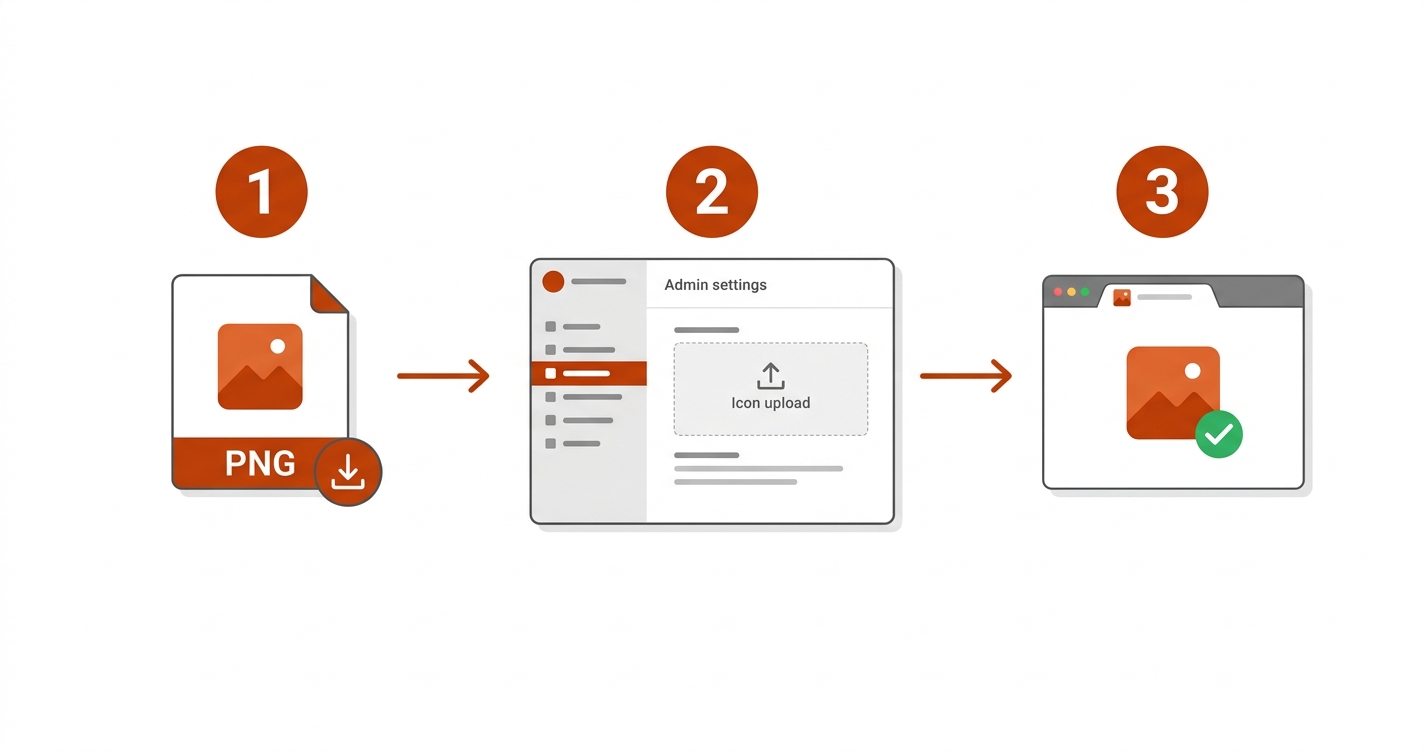
For a WordPress site, you need exactly one file: a square PNG of at least 512 × 512 pixels. Upload it as your Site Icon and WordPress creates every other size for you.
02 · Free tool
Free favicon generator
Upload your logo, or type one or two letters or an emoji. The generator previews your icon in a light tab, a dark tab, a Google result and a phone home screen, then builds every file: a 512-pixel Site Icon for WordPress, a multi-size favicon.ico, an Apple touch icon, Android icons, a web manifest and the HTML tags. Everything happens in your browser. Nothing is uploaded, and there is no AI involved — it is ordinary image drawing.
Favicon Studio
Works offline once the page has loaded
No upload · No sign-up
Loading the favicon generator… If this message stays, your site is blocking inline scripts — see the setup notes for this article.
Live preview
Light tab, 16 px
Dark tab, 16 px
Search result
Every size
Download
The ZIP contains site-icon-512.png, favicon.ico (16, 32 and 48 px), apple-touch-icon.png (180 px), icon-192.png, icon-512.png, favicon-16x16.png, favicon-32x32.png, site.webmanifest and head-tags.html. Emoji look different on each device; the PNG files keep the look you see here.
03 · Specs
The sizes and formats you actually need
Favicon advice online is full of long lists — 20 sizes, special tiles for old Windows versions, separate files for every device. Most of that is outdated. In 2026 a small set covers every browser and device that matters, and on WordPress the list is even shorter.
| File | Size | Used by | On WordPress |
|---|---|---|---|
| Site Icon source PNG | 512 × 512 | WordPress makes every size below from it | The only file you upload |
| favicon.ico | 16, 32 and 48 in one file | Browsers and tools that request /favicon.ico automatically |
Optional — upload to your site's root folder if your logs show 404 errors for it |
| 32 × 32 PNG | 32 × 32 | Browser tabs and bookmarks | Created automatically |
| Apple touch icon | 180 × 180 | iPhone and iPad home screens | Created automatically |
| 192 and 512 PNG | 192 × 192, 512 × 512 | Android home screens and installable web apps (via the web manifest) | 192 created automatically |
| SVG icon | Any (vector) | Modern browsers, including Safari 26 and later; stays sharp at every size | Not supported by the Site Icon setting; add it manually if you want one |
When you set a Site Icon, WordPress prints four tags in your page's <head>: a 32 × 32 icon, a 192 × 192 icon, a 180 × 180 Apple touch icon, and a 270 × 270 image for Windows tiles. You do not need to add any of them yourself.
An SVG favicon is lovely — one tiny file, perfectly sharp, and it can even switch colors in dark mode. But Google Search's favicon documentation does not list SVG among its supported formats, and older browsers ignore it. Keep a PNG or ICO version as well.

04 · WordPress
How to add a favicon in WordPress
WordPress calls the favicon a Site Icon. Since WordPress 6.5 the setting lives on the General Settings screen; before that it was in the Customizer. The official documentation asks for a square image of at least 512 × 512 pixels and recommends PNG.
WordPress 6.5 and newer
- Prepare the file. Use the "WordPress Site Icon (512 PNG)" button in the generator above, or export a square 512 × 512 PNG from your design app.
- Open Settings → General in your dashboard.
- Find "Site Icon" and click "Choose a Site Icon". Upload the PNG or pick it from the Media Library.
- Click "Save Changes" at the bottom of the screen.
- Check it. Open your site in a private window. The new icon should appear in the tab within a few seconds.
WordPress 6.4 and older
Go to Appearance → Customize → Site Identity, click Select Image under "Site Icon", upload the file and click Publish. If you are still on an old version, updating WordPress is worth doing for security reasons alone.
If you set a Site Icon, remove any favicon tags a theme option, plugin or old header.php edit added by hand. Two sets of icon tags make browsers pick one unpredictably, and you will spend an hour wondering why the "wrong" icon shows.
How to confirm it worked
Right-click your homepage and choose View page source, then search for rel="icon". You should see links ending in -32x32.png and -192x192.png, plus an apple-touch-icon line. If you are moving to a new design, our guide to changing your WordPress theme without losing content explains why the Site Icon survives a theme switch while some theme-specific settings do not.
05 · Other sites
Adding a favicon to any other website
On a hand-built site, a static site generator or a platform that lets you edit the <head>, you place the files yourself:
- Upload the files to your site's root folder — the same folder as your homepage — so they load at addresses like
yourwebsite.com/favicon.ico. - Add the tags inside
<head>on every page. The generator's "Copy tags" button gives you the exact lines. - Edit
site.webmanifestsonameandshort_namematch your site. Android uses them when someone adds your site to the home screen. - Test in a private window and on a phone.
<link rel="icon" href="/favicon.ico" sizes="16x16 32x32 48x48">
<link rel="icon" href="/icon-192.png" type="image/png" sizes="192x192">
<link rel="apple-touch-icon" href="/apple-touch-icon.png">
<link rel="manifest" href="/site.webmanifest">
Planning a new site rather than fixing an old one? Our step-by-step guide to building a website from scratch covers where a favicon fits in the launch checklist, and building a professional WordPress site on a budget covers the rest of the branding basics.
06 · Design
How to make a favicon that works at 16 pixels
A 16 × 16 icon is 256 pixels in total — fewer than in this sentence's first word at normal reading size. Most full logos turn into a smudge at that scale. These rules keep yours readable:
Use one symbol, not the whole logo
An initial, a monogram or the logo's mark without its wordmark. "TZ" survives at 16 px; "ThemeZone" does not.
Bold shapes and thick strokes
Hairlines and small details disappear. Heavy letter weights and simple geometric shapes stay crisp.
Strong contrast
The mark must stand out from its own background. Aim for at least 3:1 between the letter and the fill — the generator warns you if it is lower.
Test light and dark tabs
A dark logo on a transparent background vanishes in dark-mode tabs. A solid background or a light outline fixes it.
Fill the square
Keep padding modest — around 8–15%. Too much padding makes the icon look smaller than everyone else's in the tab bar.
Solid background for home screens
iPhones fill transparent areas of an Apple touch icon with black. The generator always gives that file a solid background.
Brand colors matter here too. If you have not chosen yours yet, the image guides on ThemeZone — WebP vs JPEG vs PNG and the website image size guide — explain why PNG is the right format for a small, sharp icon with flat colors.
07 · Google
How favicons appear in Google Search
Google shows a favicon next to your site name in search results, but only if it can find and fetch a suitable one. Its documentation sets out a few rules:
- The favicon must be square (1:1) and at least 8 × 8 pixels; Google recommends something larger than 48 × 48 so it looks good everywhere.
- Supported formats include ICO, PNG, JPEG, GIF, BMP, PPM and TIFF. SVG is not on that list.
- Googlebot must be able to crawl your homepage, and Googlebot-Image must be able to crawl the favicon file. If your robots.txt blocks
/wp-content/uploads/, Google cannot fetch a WordPress Site Icon. - The favicon's URL should be stable — don't change it often.
Google says it can take from several days to several weeks for a new favicon to appear, and that a favicon is never guaranteed even when every rule is met. To speed things up, request indexing of your homepage with the URL Inspection tool in Search Console — see our guide to adding your site to Google Search Console if you have not connected it yet.
08 · Avoid
Common mistakes
| Mistake | What happens | Fix |
|---|---|---|
| Shrinking the full logo with its wordmark | An unreadable blur at 16 px | Use the symbol or an initial only |
| Uploading a small source (for example 64 × 64) | WordPress upscales it; larger sizes look blurry on phones | Start from 512 × 512 or larger |
| A non-square image | Squashed or awkwardly cropped icons | Make it square first, choosing "fit" or "crop" deliberately |
| A dark mark on a transparent background | Invisible in dark-mode tabs | Add a solid background or a light outline |
| Icon tags from a plugin and the Site Icon at once | Browsers pick either one; changes seem to "not work" | Keep one source of favicon tags |
| Blocking uploads in robots.txt | No favicon in Google results | Allow Googlebot-Image to fetch the file |
| Changing the icon file every few weeks | Google and browsers keep showing old versions | Pick a design and keep its URL stable |
09 · Fixes
Troubleshooting
The old icon still shows in my browser
Browsers cache favicons very aggressively — often far longer than the page itself. Open your site in a private window first; if the new icon appears there, the old one is only cached on your machine. To clear it, open the icon's own URL in a tab and reload it, or clear the browser's data for your site. Bookmarks can keep the old icon until you revisit the page.
Google still shows a globe or my old icon
Give it time — days to weeks, by Google's own estimate. Then check the rules above: a square icon larger than 48 × 48, a crawlable homepage, and a favicon URL that robots.txt does not block. Requesting indexing of the homepage in Search Console can help.
The icon looks blurry on a phone
The source was too small, so WordPress had to scale it up. Upload a 512 × 512 version. If it still looks soft, simplify the design — fine detail blurs at every size.
My iPhone shows a black box around the icon
The Apple touch icon has transparent areas, which iOS fills with black. Give the icon a solid background color. Files from the generator always do this for the Apple touch icon.
A caching plugin or CDN serves the old file
Purge the cache for your homepage and for the icon files, then reload in a private window. If you replaced a file but kept the same name, some CDNs need a full purge before they fetch the new version.
10 · Questions
Frequently asked questions
What size should a favicon be?
Start from a square image of at least 512 × 512 pixels. From that, browsers use 16 × 16 and 32 × 32 versions in tabs, phones use 180 × 180 and 192 × 192, and installable web apps use 512 × 512. WordPress creates the smaller sizes from your 512-pixel Site Icon automatically.
Do I still need a favicon.ico file?
Not for WordPress pages, which link to PNG icons. Some browsers, feed readers and tools still request /favicon.ico by default, so uploading one to your site's root folder avoids pointless 404 errors. The generator builds a multi-size ICO for that purpose.
Can I use an SVG favicon?
Yes, as an addition. Chrome, Edge, Firefox and Safari 26 and later support SVG favicons, but Google Search does not list SVG as a supported favicon format. Keep a PNG or ICO version for Google and older browsers.
Why isn't my favicon showing in Google?
It can take several days to several weeks to appear. Check that the icon is square and larger than 48 × 48, that Google can crawl your homepage and the icon file, and that the icon's URL is not blocked in robots.txt. Even then, Google does not guarantee that a favicon will be shown.
Does a favicon help SEO?
Not directly — it is not a ranking factor. It can make your result easier to recognise among others, and it makes a new site look finished, which helps visitors trust it.
How do I change my favicon in WordPress?
In WordPress 6.5 or newer, go to Settings → General, click the current Site Icon, choose a new image and save. In older versions, use Appearance → Customize → Site Identity. Then clear your browser cache or check in a private window.
Can I use an emoji as a favicon?
Yes. Type it into the generator and download the PNG files. Emoji look different on Apple, Android and Windows devices, so turning the emoji into an image keeps the look consistent for every visitor.
11 · Wrap-up
Conclusion and next step
A favicon is one of the smallest jobs on a new website and one of the most visible. Keep it simple: one bold symbol, strong contrast, a solid background, and a single 512-pixel source file. On WordPress that file goes into Settings → General → Site Icon, and WordPress handles every other size.
Next step: build your icon in the generator above, upload the 512-pixel PNG as your Site Icon, and check it in a private window and on your phone. While you are polishing your images, compress the rest of your WordPress images so your pages load fast too.
Related guides on ThemeZone
Sources
- Google Search Central — Define a favicon to show in search results
- WordPress.org Documentation — Creating a Favicon (Site Icon in General Settings since WordPress 6.5)
- WebKit — News from WWDC25: WebKit in Safari 26 beta (SVG favicons)
- web.dev — Add a web app manifest